


Grants API
How to Use the Grants API
The Grants API is how EPA shares data on grant awards. The following is a user guide for how to work with the Grants API to get the data you need.
On this page:
- Overview
- How to Access and Use the API
- Overview of Data Source Tables
- Application Document Repository to Support Grants API
- Frequently Asked Questions
Overview
Objective
To reduce the burden on programs and secondary systems to NGGS, web services provide a means for system-to-system access of data from NGGS/DataMart. These services focus on the following areas:
- Funding Opportunities
- Applications
- Grant Families
- Grant Actions
- Grant Accounting Details
Purpose
The Grants API allows users to query by any field that is in the tables, such as funding opportunity number, grant number, or award date. This Web API service, if invoked with a proper and valid field such as Funding Opportunity number, should respond with information about the field.
How to Access and Use the API
The API with Grants data (i.e., Grants API) is deployed to an internal endpoint, https://data.epa.gov/dmapinternalservice/query.
To access and use the API, ensure the user’s PC/laptop has a GraphQL API client such as Postman, Thunder Client , or another GraphQL API client, as long as it can run queries inside the EPA network instead of running off another website that does not have access to the API.
Note: If using the Postman client, install the Postman Agent to access private resources such as the internal endpoint.
How to Access the Grants API
This API is internal to the EPA network but can be accessed internally or externally to the EPA network.
This API is protected by an API key. To use, you must add the HTTP Header of “x-api-key” with the key value. A key can be requested by contacting Kevin Wilson (Wilson.Kevin@epa.gov) and copy dmap-admin@epa.gov.
External Service/User: If an external service or user (i.e., not in EPA Active Directory/Office 365) needs to access the API, please submit a request to Kevin Wilson (Wilson.Kevin@epa.gov) with the IP addresses that need to be whitelisted.
The screenshot below shows the Headers tab for the query in Postman:

Example Queries
Two example queries are shown below.
Example 1:
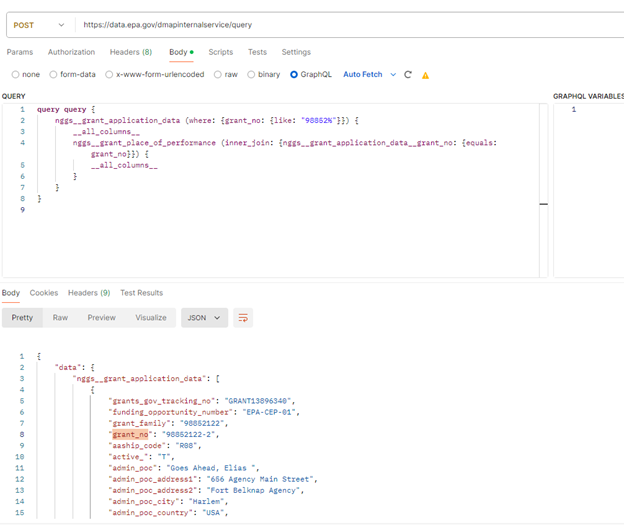
The Example 1 query below calls the grant_application_data table in the nggs schema in PostgreSQL. It is searching for grant numbers that begin with “98852”. It will return results for all the columns from the grant_obligations table and is joined to the grant_place_of_performance table on the grant_no column. All the columns from the grant_obligations table will be returned.
query query {
nggs__grant_application_data (where: {grant_no: {like: "98852%"}}){
__all_columns__nggs__grant_place_of_performance (inner_join: {nggs__grant_application_data__grant_no: {equals: grant_no}}) {__all_columns__}}}
The screenshot below shows the Example 1 query and its results in Postman:
Example 2:
The Example 2 query below is run against the grant_application_data table, searching for applications that have a funding opportunity number of “EPA-R-OAR-APS-24-02”. This table is then joined to the funding_opportunity table on the funding_opportunity_number column. All columns from both results are limited to 10 as this query has a potential for a large result set and the browser may freeze when trying to display the results.
- query query {
- nggs__grant_application_data (limit: 10, where: {funding_opportunity_number: {equals: "EPA-R-OAR-APS-24-02"}}) {
- __all_columns__
- nggs__funding_opportunity (inner_join: {nggs__grant_application_data__funding_opportunity_number: {equals: funding_opportunity_number}}) {
- __all_columns__
- }
- }
- }
Grant Attachments
For select grants, the attachments for the grant are also made available through the API. The API provides two methods to list and then download attachments.
Listing attachments
Make a HTTP GET request to https://data.epa.gov/dmapinternalservice/files/nggs (making sure to include the x-api-key HTTP header) and the API will return a JSON list of the subfolders available. These items will include the funding opportunities and grants that have attachments to download.
After seeing the list of folders that are available, make another HTTP GET request to https://data.epa.gov/dmapinternalservice/files/nggs/[FOLDER_NAME] to retrieve a JSON listing of the files within that folder. For example, for Grant 14034871, you can make a HTTP GET request to https://data.epa.gov/dmapinternalservice/files/nggs/GRANT14034871 to view the files.
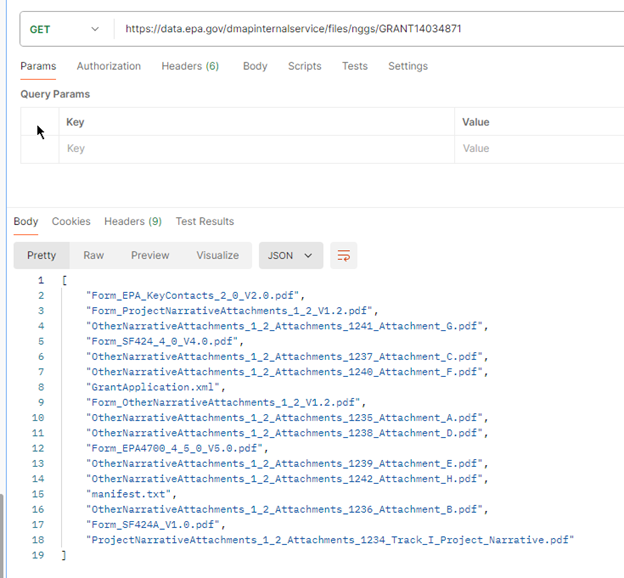
You can then append the file name of the file you wish to access, for example: https://data.epa.gov/dmapinternalservice/files/nggs/GRANT14034871/Form_ProjectNarrativeAttachments_1_2_V1.2.pdf, to download the file.
Output Formats
Output can be in XML, CSV, Excel, JSON, HTML, PDF, or a format more closely aligned to GraphQL standards.
- To get output in a XML format, send a request to https://data.epa.gov/dmapinternalservice/query/xml.
- To get output in a CSV format, send a request to https://data.epa.gov/dmapinternalservice/query/csv.
- To get output in an Excel format, send a request to https://data.epa.gov/dmapinternalservice/query/excel.
- To get output in a JSON format, send a request to https://data.epa.gov/dmapinternalservice/query/json.
- To get output in a HTML format, send a request to https://data.epa.gov/dmapinternalservice/query/html.
- To get output in a PDF format, send a request to https://data.epa.gov/dmapinternalservice/query/pdf.
- To get the data in a format that more closely aligns to GraphQL standards, send a request to https://data.epa.gov/dmapinternalservice/query/graphql.
Alternative Endpoint
An additional alternative endpoint is https://data.epa.gov/dmapinternalservice/gateway-query. This endpoint is ideal when running a query from an application in an AWS VPC or for manually handling a redirect to the results file. The constraint of this endpoint is that a query must be completed within 29 seconds or it will fail.
Overview of Data Source Tables
The following Qlik views were provided by OGD on November 16 for Grants API to consume:
- COMMITMENT_NOTICE_DATA
- FUNDING_OPPORTUNITY
- GRANT_APPLICATION_DATA
- GRANT_OBLIGATIONS
- GRANT_PLACE_OF_PERFORMANCE
- GRANTS_CORE_ACTION_BY_ACTION
- GRANTS_SUMMARY
- IN_QUEUE_GRANT_COMMITMENTS
Application Document Repository to Support Grants API
The cached files will be removed whenever grants data are refreshed. The grants application documents associated with a particular competition will also be deleted after they are awarded. Application documents are zipped and available in NGGS beyond the award date (please contact DataMart Administrator).
Storage Period
Apply EPA Data Management and Analytics Platform (DMAP) policy requirements for data storage. Note as cached files will be removed following the grants data refresh schedule; apply EPA DMAP policy requirements for data storage.
Rolling Data Store
Apply EPA DMAP policy requirements for data storage. Note as defined storage plan's capacity is reached, the oldest storage space will be utilized for the newest storage, thus deleting the oldest data.
Governance of Data Store
Apply EPA DMAP policy requirements for governance of data storage that includes availability, usability, integrity, and security of the data.
DMAP Security Plan/Access Controls
Apply EPA’s DMAP processes for security and access controls required by EPA internal data standards and policies.
Frequently Asked Questions
To be provided by Grants management.
Appendix A. Additional API Information
Who are the Grants API users?
- Primarily EPA developers.
What is basic API functionality?
- Refer to Appendix B and DMAP API PDF.
What are some examples?
- Refer to 2.1.1 Example Queries section of this document.
Appendix B. Basic API Functionality
Understand the DMAP API including how to quick start, schemas and tables, selecting fields, filtering, dates, joins, subqueries, pagination, ordering results, grouping results, variables, multiple queries, returned data.
Appendix C. Manual Handling of Redirects (e.g., Salesforce Apex Access)
The API does redirects to return the data. After receiving a response from the API, check the HTTP status code. If it is a 302, there will be a HTTP Header called “Location” that will contain the address to request to retrieve data.
The basic flow of steps is as follows:
- Make a request to the API.
- If the request is cached, you will be redirected to step 3 to get the cached result file, otherwise the query will be processed in step 2.
- If the request is not cached, you will be redirected to an address that will perform the processing of the query. You will get a redirect response that will go to the results file (step 3).
- Get the results file.
If you would prefer a simpler process, please see the 2.3 Alternative Endpoint section of this document on the alternate “gateway-query” endpoint, which will always go directly from step 1 to step 3.
The API will always return results via cached files.