


Redevelopment Mapper for Superfund and Brownfield Sites: Quick Start Instructions
Communities, developers, and state, local and Tribal governments may be interested in identifying Superfund or Brownfield sites as SI data centers. The Redevelopment Mapper for Superfund and Brownfield Sites is a helpful tool for assessing potential development opportunities, including data centers. This guide provides basic instructions for navigating the Redevelopment Mapper in order to identify sites of interest.
To access the app, please visit the Superfund Redevelopment Mapper. It is available in the following internet browsers: Google Chrome, Mozilla Firefox, Safari 3 and later, Microsoft Edge, Chrome for Android, and iOS Safari.
The app is not recommended for use in Internet Explorer. The website that hosts the app is not guaranteed to support that browser.
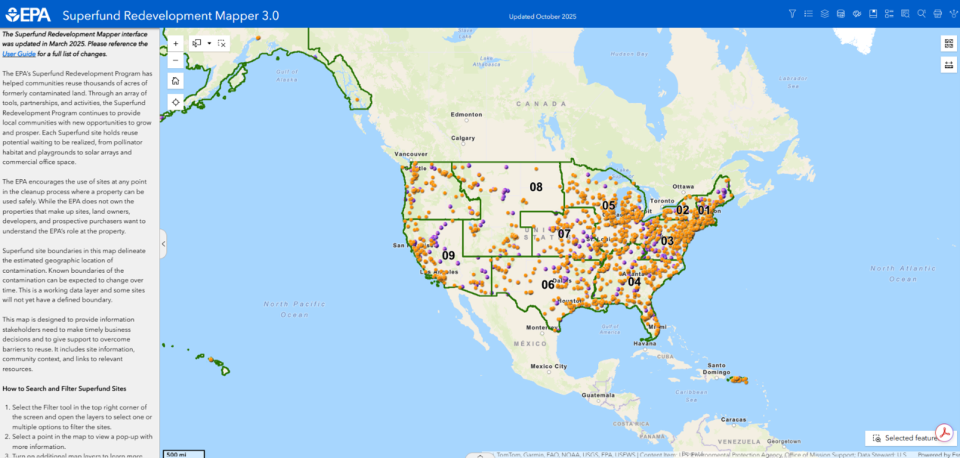
Finding Potential Sites for Redevelopment
The app’s map contains a selection of Brownfield sites over 100 acres in size and all National Priorities List and Superfund Alternative Approach Superfund sites. These sites can be searched and filtered using several parameters, including redevelopment context (e.g., proximity to transportation, energy infrastructure, population and water availability), location, size, site status and site name.
Filtering
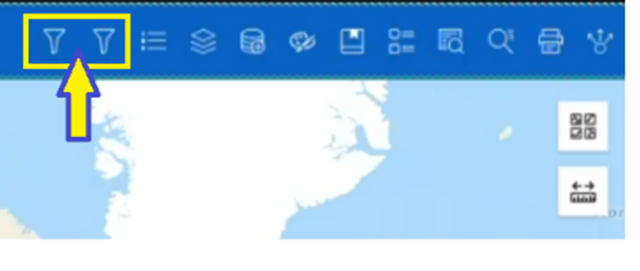
Select one of the Filter tools in the top right corner of the screen. The filter on the left is for Superfund sites and the filter on the right is for Brownfield sites.
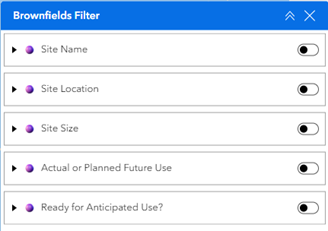
Toggle the search groups on and off. Enter your search parameters in each field.
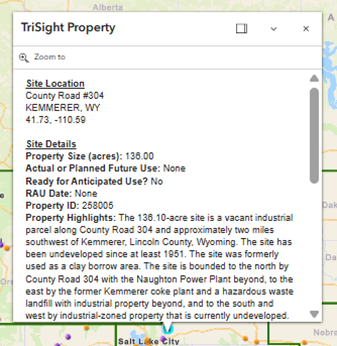
- Select a point in the map to view a pop-up box with more information.
Explore site context using layers and the add data feature
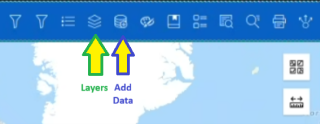
- Click on the layers button to add information about site details, redevelopment potential, community context, infrastructure, demographics or the environment.
- Use the add data button to search for additional layers available through EPA’s Geoplatform or ArcGIS Online.
Export a Search Result Table
- Select the up arrow in the center of the bottom of the map.
- Export the search results to a text file by selecting Actions>Export in the top right corner of the table and selecting Export to CSV.
For more detailed information about using the Redevelopment Mapper, reference the detailed user guide with full instructions.