U.S. flag

An official website of the United States government

Here’s how you know

Dot gov

Official websites use .gov
A .gov website belongs to an official government organization in the United States.

HTTPS

Secure .gov websites use HTTPS
A lock (LockA locked padlock) or https:// means you’ve safely connected to the .gov website. Share sensitive information only on official, secure websites.

    • Environmental Topics
    • Air
    • Bed Bugs
    • Chemicals, Toxics, and Pesticide
    • Emergency Response
    • Environmental Information by Location
    • Health
    • Land, Waste, and Cleanup
    • Lead
    • Mold
    • Radon
    • Research
    • Science Topics
    • Water Topics
    • A-Z Topic Index
    • Laws & Regulations
    • By Business Sector
    • By Topic
    • Compliance
    • Enforcement
    • Guidance
    • Laws and Executive Orders
    • Regulations
    • Report a Violation
    • Environmental Violations
    • Fraud, Waste or Abuse
    • About EPA
    • Our Mission and What We Do
    • Headquarters Offices
    • Regional Offices
    • Labs and Research Centers
    • Newsroom
    • Planning, Budget, and Results
    • Organization Chart
    • EPA History

Breadcrumb

  1. Home
  2. CAMEO

MARPLOT Software

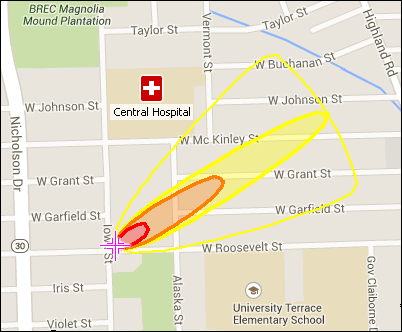
On this sample MARPLOT map, a point object (a hospital) has been drawn on the map and a tricolored ALOHA threat zone estimate is also displayed. The Google Streets basemap is the background image of the map.

MARPLOT® (Mapping Application for Response, Planning, and Local Operational Tasks) is the mapping program for the CAMEO® (Computer-Aided Management of Emergency Operations) software suite, which is used widely to plan for and respond to chemical emergencies. 

MARPLOT’s easy-to-use interface allows you to add objects to a map, as well as view and edit data associated with the objects. You can choose between several background basemap images, and you can customize your map further with annotations and online map services. You can also interact with the map in other ways, such as getting population estimates within an area. MARPLOT can be run by itself as a general mapping program. It can also be used interactively with programs in the CAMEO suite, such as to display ALOHA® (Areal Locations of Hazardous Atmospheres) threat zone estimates on the map or to link map objects to database records in CAMEO Data Manager.

On this page:

  • Download MARPLOT
  • Learn About MARPLOT
  • Get Help

Download MARPLOT

Visit the National Oceanic and Atmospheric Administration's MARPLOT webpage to download MARPLOT for Windows and Mac operating systems.


Learn About MARPLOT

To learn how to use MARPLOT refer to the "Help" function within the software and visit the CAMEO Training and Events webpage.

For a brief summary of the MARPLOT program and its capabilities, download the MARPLOT fact sheet (pdf). 


Get Help

You can report software bugs or obtain additional assistance by emailing the Risk Management Program Reporting Center (RMPRC@epacdx.net), or by calling the CAMEO help desk at (703) 227-7650 on weekdays from 8:00 a.m. to 4:30 p.m., Eastern Time.

CAMEO

  • About CAMEO
    • Online Resources
    • Training and Events
  • ALOHA Air Modeling
  • CAMEO Chemicals
  • CAMEO Data Manager
  • MARPLOT Mapping
  • Tier2 Submit
Contact Us about CAMEO
Contact Us about CAMEO to ask a question, provide feedback, or report a problem.
Last updated on November 13, 2026
  • Assistance
  • Spanish
  • Arabic
  • Chinese (simplified)
  • Chinese (traditional)
  • French
  • Haitian Creole
  • Korean
  • Portuguese
  • Russian
  • Tagalog
  • Vietnamese
United States Environmental Protection Agency

Discover.

  • Accessibility Statement
  • Budget & Performance
  • Contracting
  • EPA www Web Snapshot
  • Grants
  • No FEAR Act Data
  • Plain Writing
  • Privacy and Security Notice

Connect.

  • Data
  • Inspector General
  • Jobs
  • Newsroom
  • Regulations.gov
  • Subscribe
  • USA.gov
  • White House

Ask.

  • Contact EPA
  • EPA Disclaimers
  • Hotlines
  • FOIA Requests
  • Frequent Questions
  • Site Feedback

Follow.