


CDX Registration for EASEY
Table of Contents
- Introduction
- High-Level Registration Steps
- Key Notes and Best Practices
- User Types and Roles
- CDX Account Registration Process
- Getting Help
- Contact Information
Introduction
Effective April 2026, the CAMD Business System (CBS) and Emissions Collection and Monitoring Plan System (ECMPS) use EPA's Central Data Exchange (CDX) and Login.gov for all user registration, authentication, and access management. All CBS/ECMPS users must register and manage their access through CDX/Login.gov. This guide provides instructions for registering, managing roles, and accessing CBS/ECMPS in the integrated environment.
If you have any questions regarding the CDX registration process, please do not email the CDX help desk. Instead, please reach out to cbs-support@camdsupport.com and we will assist. CDX is not familiar with the ECMPS or CBS applications and will likely direct your inquiry to our team. For the quickest support, please contact us directly.
Key Changes for Users effective April 2026:
Users familiar with the legacy ECMPS (also referred to as ECMPS 2.0) and CBS and the related legacy log-in process should note the following key changes:
- CDX Registration Required: You must register in CDX/Login.gov before being assigned as a representative, agent, or MATS Responsible Official in CBS. The CDX login is needed to access both CBS and ECMPS 2.0.
- Consultant Access: Consultants access is no longer available and all consultants need to register as agents, requiring registration in CBS and in CDX/login.gov before being assigned facilities
- Unified Login: Use CDX/Login.gov credentials to access both CBS and ECMPS 2.0
- Organization-Based Access: Users must have a CDX role within a CDX organization
- Role-Based Permissions: DRs and Alternate DRs (ADRs) can only assign agents who have a role that shares the same CDX organization (org ID)
CBS provides secure access to various environmental programs including:
- Allowance Trading and Transfers
- Compliance Reporting and Management
- General Account Management
- Facility (Certificate of Representation) Management
- Emissions Data Submission Access
ECMPS provides secure access to program reporting tools including:
- Monitoring Plan Module
- Quality Assurance Tests Module
- Emissions Module
- MATS Data Submission Module
- Configuration Management Module
Links:
High-Level Registration Steps
Please ensure you read through the detailed CDX registration steps before reaching out for support, as step-by-step instructions are provided. The general work-flow is as follows:
- Register in CDX/Login.gov: Create an account at https://cdx.epa.gov/ and complete Login.gov setup.
- Select the EASEY Program: During registration, choose "EASEY: Emissions and Allowance System for Energy" as your program.
- Choose Your Role: Select the appropriate role (Sponsor, Submitter, Preparer) based on your responsibilities.
- Join Your Organization: Search for and select your existing organization by Organization ID. Do not search by company name. Do not create a new organization unless instructed.
- Request Sponsorship: Submit your registration and request sponsorship in the organization if required. Wait for approval and complete any required identity verification.
- Get Assigned in CBS: After your CDX registration and role are approved, your organization’s sponsor or administrator can assign you to the necessary accounts or permissions within CBS.
Key Notes and Best Practices
- Same Email: Must use the SAME email address that is currently used in CBS production
- Existing CDX Account: If you already have a production CDX account, continue using that email address and update your CBS production email to match, if different
- Update First: If your email differs, update it in CBS BEFORE registering the program service in CDX
- Login.gov Consistency: Use the same email, where possible, for Login.gov account creation
- Organization ID: CDX Organization ID (Org ID) of your role must match for all people you work with (DRs, ADRs, agents). Read through the CDX Frequent Questions which answer most questions regarding org ID selection/creation.
- Keep Track: Write down your Organization ID(s) and share with team members.
- No Direct Org-Facility Connection: CDX organizations are NOT tied to specific facilities or plants. Access is entirely people and relationship-based; facilities are accessed through individual user relationships with DRs/ADRs
- Finding Organization IDs (after an Org ID is already established):
- Primary Method: CDX Manage Page - Click "My CDX" tab, then click the gear icon labeled "Manage" in the green services bar to view all your program services, organizations, and roles
- Secondary Method: CDX Profile page - Shows Organization ID but not role-organization-program service connections
- Important: Use BOTH the Manage page and Profile page to determine the correct Organization ID to communicate with others in your group
- One Account Policy: Do not create multiple CDX accounts. If you already have multiple existing CDX accounts, ensure you use the same account for all EASEY program service activities. Accidentally logging into the wrong account, especially when attempting to complete the sponsorship approval process (for yourself or approving another user), will cause issues with your request and you will need to reach out for assistance.
User Types and Roles
CBS uses four specific CDX roles that correspond to responsibilities in CBS. Everyone who needs access to ECMPS 2.0 or CBS needs at least one role. Each role is specific to an organization, and there is no limit to roles or organizations in your account. Note: if you are already have the initial authorizer (IA) role, you do not need to add any additional roles. IAs have the highest permissions in CDX and can carry out the same responsibilities as a sponsor, preparer, or submitter.
CDX Role Definitions
1. Initial Authorizer (IA)
- Purpose: For Designated Representatives (DRs) in the system when initially establish a CDX org within the EASEY program service
- Organization: Will likely create a NEW CDX organization for their company
- Sponsorship: Does not need to be sponsored by anyone
- Permissions: Can sponsor people in their organization. Has the same permissions as Sponsor, which include preparing and submitting data (except IAs do not need to be sponsored by another user, whereas Sponsors do).
- Use Cases: Mostly for special cases (e.g., new plant submitting Certificate of Representation)
2. Sponsor
- Purpose: For DRs and ADRs (Alternate Designated Representatives)
- Organization: Register in an EXISTING organization (never create new)
- Sponsorship: Needs to be sponsored by another Sponsor or Initial Authorizer (IA)
- Permissions: Can sponsor people in their organization. Has the same permissions as Initial Authorizer, which include preparing and submitting data (except Sponsors need to be sponsored by another user, whereas IAs do not)
- Primary Role: Most DRs and ADRs should use this role
3. Submitter
- Purpose: For agents submitting data on behalf of a DR or ADR
- Organization: Register in an EXISTING organization (never create new)
- Sponsorship: Needs to be sponsored by a Sponsor or Initial Authorizer
- Permissions: Cannot sponsor others
4. Preparer
- Purpose: For agents retrieving/preparing data
- Organization: Register in an EXISTING organization (never create new)
- Sponsorship: Needs to be sponsored by a Sponsor or Initial Authorizer
- Permissions: Cannot sponsor others
Role Selection Guide
- Are you a DR for a NEW organization? → Initial Authorizer
- Are you a DR/ADR for an EXISTING organization? → Sponsor
- Are you a MATS official? → Submitter or Sponsor
- Are you an agent who submits data? → Submitter
- Are you an agent who only retrieves/prepares data? → Preparer
- Are you a consultant? → You're considered an Agent. Choose Submitter if you need to submit data or Preparer if you only need to retrieve/prepare data
We encourage anyone who is an agent to review the Agent types listed in the CBS Frequent Questions page to see all agent types and ensure you get registered in the correct CDX role.
CDX Account Registration Process
If you have any questions regarding the CDX registration process, please do not email the CDX help desk. Instead, please reach out to cbs-support@camdsupport.com and we will assist. CDX is not familiar with the ECMPS or CBS applications and will direct your inquiry to our team. For the quickest support, please contact us directly.
There are three main paths for CDX registration depending on your role and situation. Choose the path that matches your needs:
Path 1: Initial Authorizer Registration (DRs Only)
When to use: You are a DR who needs to start a new organization or are a DR for a new plant (submitting a new Certificate of Representation).
Important: This registration path is exclusively for DRs who receive direct invitation emails from CDX.
Step 1: Notify EPA
- If you are a new plant, or are taking over a plant and need a new organization, mail in a Certificate of Representation (form link).
- If you are requesting to create a new organization, email cbs-support@camdsupport.com to have EPA staff send you a pre-registration invitation email. Be sure to include your facility name(s) and ORIS code(s) in your request.
Step 2: Wait for CDX Pre-Registration Email
- You will receive a pre-registration invitation email directly from CDX.
- This email will contain your unique registration link. Do not share this link with anyone as it is uniquely tied to you.
- Do not attempt to register without receiving this official invitation.
Step 3: Registration Process
- Click the link in the email to start registration.
- Create a unique username for your account.
- Click "Confirm Registration."
- Click "Proceed to Login.gov."
Step 4: Login.gov Setup
- Login.gov Account
- If new to Login.gov: Click "Create an Account" and follow the steps.
- If existing Login.gov user: Sign in with existing credentials.
- Complete multi-factor authentication setup.
Step 5: User Information
- Fill out personal information.
- Answer three security questions.
- Submit information.
Step 6: Organization Setup
- Important: Check with your network before adding a new organization, as there may be an organization that exists with other EPA programs within CDX. Search for existing organization by Organization ID only. Searching by name will often yield incorrect org results.
- If a new organization is needed: Use the "request that we add your organization" link. Do not create an org ID for each facility; only one org ID should be created for each DR. Org IDs should not correspond to individual facilities.
- You are highly encouraged to review the CDX Registration Frequent Questions (especially questions 7, 8, and 9) as they answer common org ID related questions/confusion.
Step 7: Identity Verification
- Complete LexisNexis verification process.
- If LexisNexis fails, you have two options:
- Contact the CDX Help Desk to request a reset of your LexisNexis identity verification attempts; or
- Print and complete the CDX Electronic Signature Agreement (ESA). Mail the ESA by following the instructions provided. Mail to the address on the form.
- Note: If you choose to opt-out of the online identity verification process, you must complete and mail a paper CDX ESA form in order for your identity to be verified.
Step 8: Approval Process
- Your role will be automatically processed as part of the bulk pre-registration.
- If you experience any delays, email cbs-support@camdsupport.com.
- Subject: "CDX Bulk Pre-Registration - Status Inquiry"
- Include: First name, last name, email, CDX username.
Step 9: Confirmation
- Receive email: "Your Central Data Exchange (CDX) CDX Role has been activated by EPA."
- Log into CDX to confirm active status.
- Find your Organization ID using both "My Profile" and the Manage page ("My CDX" tab → gear icon "Manage") to see role-program service connections.
Next Steps in CBS (Designated Representative)
Once your Initial Authorizer role is active, log into CBS using your CDX/Login.gov credentials. To become recognized as a DR, notify cbs-support@camdsupport.com that you have completed CDX registration and provide your CDX username. Once approved, you will be able to manage your facility and assign Alternate DRs and Agents in CBS. In CBS, use the organization management or user administration sections to add, approve, or manage assignments for your team. The primary DR is responsible for all submissions and agent assignments.
Path 2: Adding EASEY to New CDX Account
When to use: You do not have an existing CDX account.
Step 1: Start Registration
- Go to https://cdx.epa.gov/
- Click "Register with CDX."
- Accept Terms and Conditions.
Step 2: Program Selection
- Type "EASEY" to filter results.
- Select "EASEY: Emissions and Allowance System for Energy."
Step 3: Role Selection
- Select the appropriate role:
- Sponsor: If you're a DR/ADR or MATS official with sponsorship responsibilities
- Submitter: If you submit data as an agent or are a MATS official
- Preparer: If you retrieve/prepare data as an agent
Step 4: Account Creation
- Enter a unique username.
- Click "Proceed to Login.gov."
- Complete Login.gov setup (same as Path 1).
Step 5: Organization Selection
- Search for existing organization by Organization ID. Do not search by company name. Contact your DR/ADR to ensure you use the correct org ID when submitting your request.
- Critical: Use the same email address that you currently have (or will have) in CBS production.
- Do NOT create a new organization.
Step 6: Sponsorship Request
- Provide the email of your Sponsor or Initial Authorizer in your organization.
- Sponsor receives an email and must approve the request.
- Sponsor logs in and signs the Sponsor Agreement.
- Initial Authorizers and Sponsors can approve requests by going to the "Sponsorship" tab in CDX.
Step 7: Complete Registration
- Click the link in the email once sponsorship is approved.
- Complete LexisNexis/ESA verification.
- If LexisNexis fails, you have two options:
- Contact the CDX Help Desk to request a reset of your LexisNexis identity verification attempts; or
- Print and complete the CDX Electronic Signature Agreement (ESA). Mail the ESA by following the instructions provided. Mail to the address on the form.
- Note: If you choose to opt-out of the online identity verification process, you must complete and mail a paper CDX ESA form in order for your identity to be verified.
- If LexisNexis fails, you have two options:
- Email EPA if assistance is needed.
Next Steps in CBS (Sponsor, Submitter, Preparer)
After your CDX role is approved and active, log into CBS with your CDX/Login.gov credentials. Your organization’s Initial Authorizer or Sponsor must assign you to the appropriate responsibilities in CBS (such as plant, account, or submission permissions). Check the "Facilities," "Accounts," or run reports to view your current responsibilities. If you do not see your expected access, contact your organization's DR or ADR for assignment. If you are an Agent, your DR or ADR must assign you in CBS (see the Agent section of the CBS help file for step-by-step instructions). Agents are not automatically assigned when a new DR/ADR is appointed; each representative must assign their own Agents. If you are an ADR, your DR must assign you in CBS.
Path 3: Adding EASEY to Existing CDX Account
When to use: You already have a CDX account with Login.gov but need to add the EASEY program service to access CBS.
Step 1: Login to CDX
- Go to https://cdx.epa.gov/
- Sign in with your existing Login.gov credentials.
Step 2: Add Program Service
- Navigate to the "My CDX" tab.
- Click "Add Program Service" or similar option.
- Type "EASEY" to filter results.
- Select "EASEY: Emissions and Allowance System for Energy."
Step 3: Role Selection
- Select the appropriate role:
- Sponsor: If you're a DR/ADR or MATS official with sponsorship responsibilities
- Submitter: If you submit data as an agent or are a MATS official
- Preparer: If you retrieve/prepare data as an agent
Step 4: Organization Selection
- Search for existing organization by Organization ID. Do not search by company name.
- Critical: Ensure this matches your team's CDX organization.
- Do NOT create a new organization.
Step 5: Sponsorship Request
- Provide the email of your Sponsor or Initial Authorizer in your organization.
- Sponsor receives an email and must approve the request.
- Sponsor logs in and signs the Sponsor Agreement.
- Initial Authorizers and Sponsors can approve requests by going to the "Sponsorship" tab in CDX.
Step 6: Complete Process
- Click the link in the email once sponsorship is approved.
- Complete LexisNexis/ESA verification, if prompted.
- If LexisNexis fails, you have two options:
- Contact the CDX Help Desk to request a reset of your LexisNexis identity verification attempts; or
- Print and complete the CDX Electronic Signature Agreement (ESA). Mail the ESA by following the instructions provided. Mail to the address on the form.
- Note: If you choose to opt-out of the online identity verification process, you must complete and mail a paper CDX ESA form in order for your identity to be verified.
- If LexisNexis fails, you have two options:
- Verify your role is active in CDX.
Next Steps in CBS
After your CDX role is approved and active, log into CBS with your CDX/Login.gov credentials. Your organization’s Initial Authorizer or Sponsor must assign you to the appropriate responsibilities in CBS (such as plant, account, or submission permissions). Check the "Facilities," "Accounts," or run reports to view your current responsibilities. If you do not see your expected access, contact your DR or ADR for assignment. If you are an Agent, your DR or ADR must assign you in CBS (see the Agent section of the CBS help file for step-by-step instructions). Agents are not automatically assigned when a new DR/ADR is appointed; each representative must assign their own Agents. If you are an ADR, your DR must assign you in CBS.
Final Sponsorship Approval Process
Sponsorship Requests:
Initial Authorizers and Sponsors can approve sponsorship requests by going to the "Sponsorship" tab in CDX.
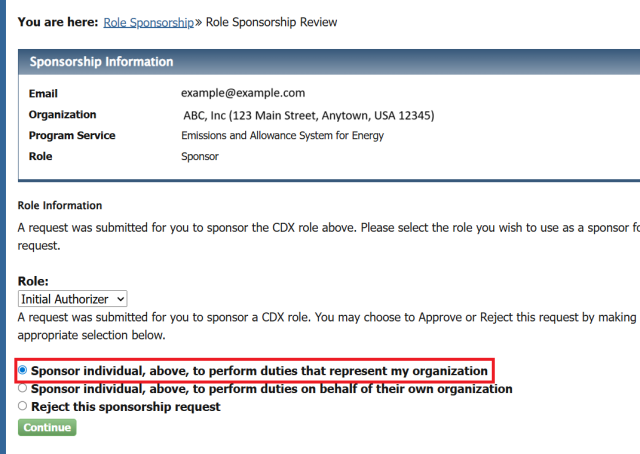
As part of the approval process, when the IA/Sponsor reaches this step, select the first option, "Sponsor individual, above, to perform duties that represent my organization". Ensure the correct role is selected (IA or Sponsor) that corresponds to the same org as the sponsorship requestor. See the image below:
How to Assign and Manage Roles in CBS
You are encouraged to read through the CBS Frequent Questions page for more in-depth details on how to assign and manage roles in CBS. An overview is provided below:
Designated Representatives (DRs):
- Use CBS to submit a Certificate of Representation electronically or by paper form to become recognized as a DR.
- Once recognized, DRs can assign Alternate DRs and Agents in the CBS UI (see the help file for details).
- DRs are responsible for all submissions and agent assignments for their facility.
Agents:
- Agents must be assigned by a DR or ADR in CBS. Assignment is not automatic when a new DR/ADR is appointed.
- There are several types of Agents (Source Management, Compliance, Allowance Trading, General Account Management, Retrieve, Submit) with different permissions. See CBS Frequent Question #3 for details on each type.
- To assign an Agent, DRs/ADRs should use the Agent management section in CBS or submit the paper Agent Notice of Delegation form, if preferred.
General CBS Tips:
- The CBS help file, accessible from any screen (including the login screen), provides step-by-step instructions for all user and agent management actions.
Getting Help
Before Contacting Support
- Review Frequent Questions Pages:
- See the CDX Registration Frequent Questions page for answers to common questions related to the CDX registration process
- See the CBS Frequent Questions page for answers to common questions related to CBS roles and how to assign them
- Verify Organization ID: Ensure you're using the correct CDX Organization ID - Go to "My CDX" tab and click the gear icon "Manage" to see all your organizations and roles
- Check Role Status: Confirm your CDX role is active (not pending) using the CDX Manage page
Common Issues and Solutions
- Role Not Approved:
- Check if LexisNexis verification completed successfully. If LexisNexis fails, you have two options:
- Contact the CDX Help Desk to request a reset of your LexisNexis identity verification attempts; or
- Print and complete the CDX Electronic Signature Agreement (ESA). Mail the ESA by following the instructions provided. Mail to the address on the form.
- Note: If you choose to opt-out of the online identity verification process, you must complete and mail a paper CDX ESA form in order for your identity to be verified.
- Ensure your sponsor has completed the sponsorship approval via their account and that you've logged in after the sponsorship has been approved to complete the registration.
- Check if LexisNexis verification completed successfully. If LexisNexis fails, you have two options:
- Sponsorship Issues: Verify sponsor has correct role (IA or sponsor) and organization ID (must match yours). If the sponsor has not completed their identity verification
Self-Help Resources
- CDX: For account status
- CDX Manage Page: Click "My CDX" tab then the gear icon "Manage" to view all organizations, roles, and program services
- Organization IDs: Use BOTH your CDX Profile page AND the Manage page to identify the correct Organization ID for your role-program service connections
- Role Status: View current roles and sponsorship status in CDX
- CBS: To verify current contact information and responsibilities
Contact Information
Primary Support Contact
If you have any questions regarding the CDX registration process, please do not email the CDX help desk. Instead, please reach out to cbs-support@camdsupport.com and we will assist. CDX is not familiar with the ECMPS or CBS applications and will direct your inquiry to our team. For the quickest support, please contact us directly.
Email: cbs-support@camdsupport.com
- CDX registration questions
- CBS access issues
- Role assignment problems
- Account linking issues
- Missing plant/facility access
- General CBS support
Important Notes
Critical Requirements
- Email Consistency: Use the SAME email address in CDX as you have in CBS production
- One Account Policy: Do not create multiple CDX accounts (contact support first)
- Organization Matching: Ensure CDX Organization ID (in relation to roles) matches across your team
- Production Updates: Update CBS production information before CDX registration or, if new to CBS, ensure the email used for CBS matches what is in CDX
Account Maintenance
- Regular Updates: Keep CBS information current
- Network Coordination: Stay in contact with your organization's sponsors
« Return to the Re-engineering Effort page
« Return to the Reporting Data with ECMPS page
« Return to the CAMD Business System (CBS) page
Last Updated: 04/02/2026
Note: The content on this page contains content produced by generative SI and was thoroughly reviewed by a human prior to publication.